7 Best Read AI Alternatives in 2026 (Compared by Why You're Switching)
 Shivani Bohare17 min read

On this page
- Why People Look for Read AI Alternatives
- Auto-join and calendar permissions
- Read AI pricing and plan limits
- Deeper CRM and sales workflows
- Data privacy and security controls
- Best Read AI Alternative by Reason for Switching
- Quick Comparison Table
- The 7 Best Read AI Alternatives
- 1. Fireflies
- 2. Otter
- 3. Fathom
- 4. Fellow
- 5. tl;dv
- 6. Granola
- 7. Microsoft 365 Copilot
- How to Switch From Read AI
- Choosing Your Read AI Replacement
- Frequently Asked Questions
- What is the best alternative to Read AI?
- Is there a free alternative to Read AI?
- Is Read AI safe to use?
- How do I remove Read AI from my meetings?
- Is Fireflies better than Read AI?
Fireflies is the closest full replacement for Read AI because it covers meetings, email, and Slack, then carries what you discuss into your CRM. Your best pick among Read AI alternatives still depends on the reason you're leaving.
Granola fits you if you want no bot in the call, and Fathom fits a tight budget with unlimited free recordings. Sales teams lean toward tl;dv, Teams-first companies toward Microsoft 365 Copilot, agenda-led teams toward Fellow, and individuals toward Otter.
Why People Look for Read AI Alternatives
Read AI transcribes Zoom, Google Meet, and Teams calls in 35 languages, summarizes your email and chat, and lists about 30 integrations and connectors, including Zapier, Claude, and ChatGPT.
You also get mobile apps, Smart Folders, coaching metrics, and Ada, its Digital Twin assistant.
You'll usually start comparing read.ai alternatives for one of four reasons.
Auto-join and calendar permissions
Most Read AI competitors auto-join too. The complaints center on how Read AI reaches calendars you never set up. You can create an account just by signing up to view someone else's report, and one Teams user described on Microsoft's forum in April 2025 how Read AI then began joining their internal meetings.
A similar experience was described by a Reddit user in r/MicrosoftTeams, who initially couldn't understand why Read AI kept appearing in meetings despite never knowingly creating an account or installing the integration.

Alt text: Microsoft Teams user reports on Reddit that Read AI began automatically joining internal meetings without their knowledge
After investigating, the user traced the problem to a transcript invitation sent by a meeting attendee. They recalled clicking the link and using Microsoft's single sign-on (SSO) to view the transcript. According to the user, that sign-in connected Read AI to their Outlook calendar and led the tool to automatically invite itself to meetings, apparently without their awareness. They eventually signed back in, disconnected the Outlook and Teams integrations, revoked its access, and deleted their account.
Read AI's help center runs several articles on how to remove Read AI from meetings, since it can keep joining after you delete your account if another invitee uses it or you have a second account. The University of Washington blocked Read AI's Zoom and Teams integrations in July 2026 after it appeared in meetings unannounced.
Did You Know? Bloomberg Law notes that California, Florida, Illinois, Pennsylvania, and Washington all require consent from every participant before anyone records a conversation. It recommends disclosing any AI notetaker upfront. |
Read AI pricing and plan limits
Read AI pricing climbs with how much you need to keep. The Free plan stops at five meeting transcripts a month and one-hour meetings, which limits it to testing. Pro lifts the cap at $15/user/month billed annually, or $19.75/user/month, month-to-month; video playback needs Enterprise ($22.50 or $29.75), and Enterprise+ ($29.75 or $39.75) needs five licenses.
Free users can't join a Workspace, and every Workspace license shares one plan, which blocks mixed tiers on one team. File uploads run on monthly credits of 100 on Pro, 200 on Enterprise, and 300 on Enterprise+.
If cost drives your search for Read AI alternatives, the Read AI vs Fireflies gap is $15 against $10/user/month billed annually, or $19.75 against $18 month-to-month. Most Read AI vs Otter comparisons start here too, with Otter Pro at $8.33/user/month billed annually.
Deeper CRM and sales workflows
Read AI's CRM integrations sync contacts and meeting notes with HubSpot and Salesforce from Pro upward. If you want each call to fill custom CRM fields and flag deal risks automatically, look for CRM automation built into the tool. Teams outgrowing heavier revenue platforms can also see why Fireflies works as the best Gong alternative.
Data privacy and security controls
Asking if Read AI is safe means asking what happens to your data and which plan protects it. Read AI says it encrypts data in transit and at rest, doesn't sell your data, and trains on your meetings only with your opt-in.
If you handle sensitive information, look at Enterprise+, the only tier with HIPAA compliance and a custom data retention policy.
Also read: Are AI notetakers safe?
Best Read AI Alternative by Reason for Switching
Fireflies is the best Read AI alternative if you use Read AI across meetings, email, and chat. Most Read AI alternatives solve one problem well, and the picks below match each to a reason.
- Pick Fireflies for meetings, email, Slack, and CRM in one workspace.
- Choose tl;dv if you sell and want CRM outcomes logged automatically.
- Go with Fathom if you need the most generous free plan.
- Use Granola if you want meeting notes with no bot in the call.
- Stay with Microsoft 365 Copilot if your company runs on Microsoft 365.
- Try Fellow if you run every meeting from a shared agenda.
Did You Know? The average worker receives 117 emails and 153 Teams messages every weekday, and 57% of meetings are ad hoc calls without a calendar invite, per Microsoft's 2025 Work Trend Index. |
Quick Comparison Table
Compare the leading Read AI competitors below, with Read AI pricing in the first row for reference. Each price shows the lowest paid tier billed annually, then month-to-month, and our meeting transcription software roundup adds more contenders.
Tool | Best for | Free plan | Starting price | Capture options |
Fireflies | All-round replacement | Yes; includes 3 AI summaries a month, 800 mins of storage per seat (pooled) | Pro $10/user/month billed annually, or $18/user/month month-to-month | Meeting Bot, Desktop App, Chrome Extension, Mobile App, File Upload |
Otter | Low-cost transcription | 300 minutes a month | Pro $8.33/user/month billed annually, or $16.99/user/month month-to-month | Meeting bot, desktop and mobile apps, file import |
Fathom | Free option | Unlimited recordings | Premium $15/user/month billed annually, or $19/user/month month-to-month (2-user minimum) | Meeting bot or bot-free capture (beta) |
Fellow | Meeting agendas | 5 AI notes and 5 recordings per user, lifetime | Team $7/user/month billed annually, or $11/user/month month-to-month | Meeting bot |
tl;dv | Sales teams | Unlimited meetings | Pro $18/user/month billed annually, or $29user/month month-to-month | Zoom, Google Meet, Teams recorder |
Granola | Bot-free capture | Limited meeting history | Business $14/user/month flat rate, no annual billing | Device audio, desktop and mobile |
Microsoft 365 Copilot | Microsoft 365 shops | Paid license needed for recaps | Copilot Business, $18/user/month billed annually (promo) or $25.20/user/month month-to-month, plus Microsoft 365 | Built into Teams |
Pricing verified: October 8, 2026, on each vendor's pricing page.
Pro Tip: Count who needs a paid seat before you compare read.ai alternatives on price. Read AI says only one person per meeting needs a license to share a report, and most tools here charge per user, which means licensing only your meeting hosts can lower your bill. |
The 7 Best Read AI Alternatives
Each of these Read AI competitors links to its pricing page and check date. Our list of automated meeting notes software covers more tools.
1. Fireflies
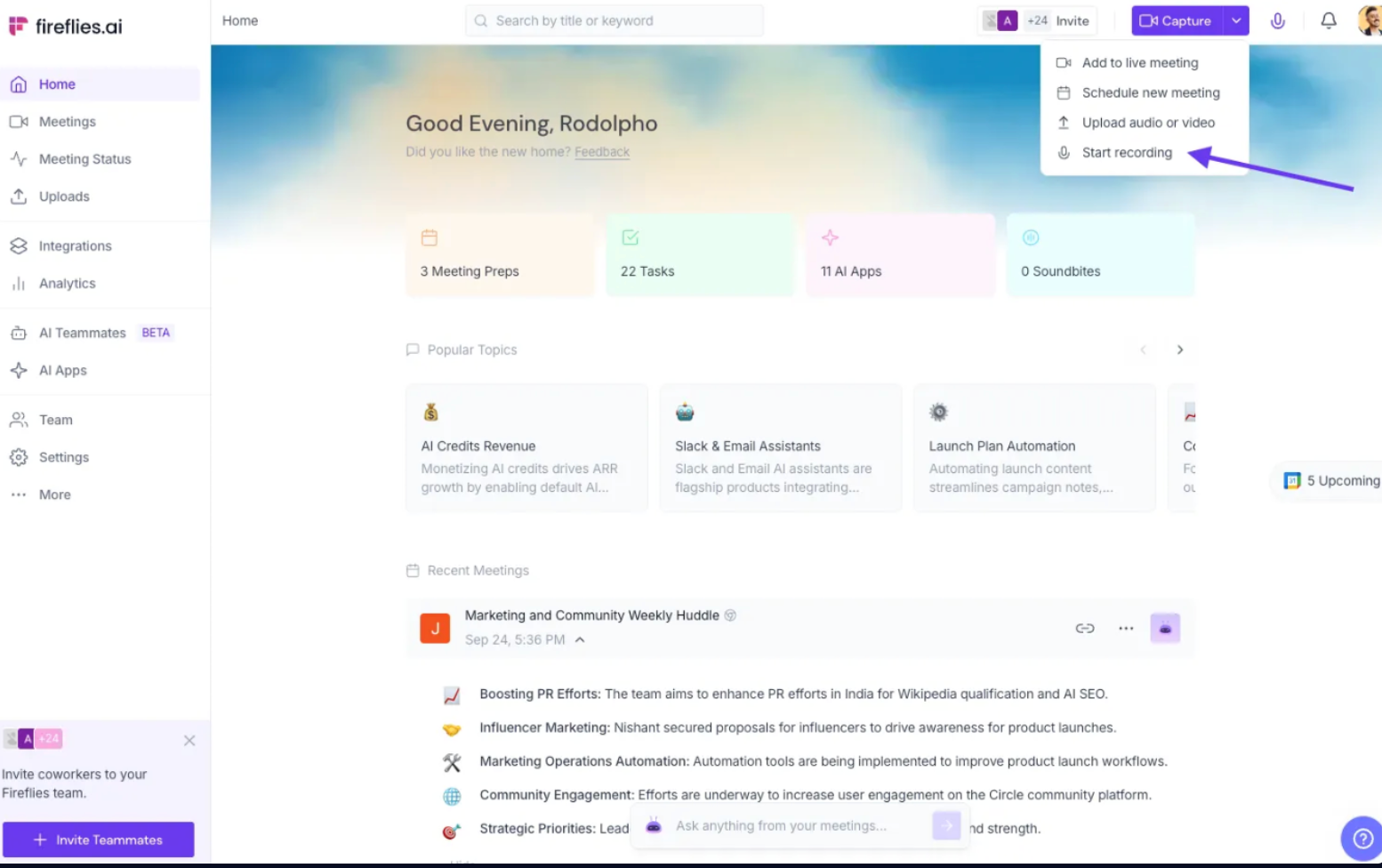

Alt text: Fireflies dashboard with the Capture menu open, showing Add to live meeting, Upload audio or video, and Start recording
Best for you if you use Read AI across meetings, email, and chat.
Fireflies is the #1 AI Teammate for meetings, email, Slack, CRM, and work, trusted by 20M+ people across 1M+ organizations and 75% of the Fortune 500. In a Read AI vs Fireflies comparison, you get 100+ languages to Read AI's 35, with 99% accuracy in English and 95% in other languages.
You also get 200+ AI Skills and transcript exports as DOCX, PDF, SRT, CSV, or JSON. Fireflies.ai does not use customer data to train any AI models. Your personal data is never used to train AI models. Users own their data.
Key features:
- You capture calls with the Meeting Bot, the Desktop App with or without the bot, the Chrome Extension for bot-free Google Meet calls, the Mobile App for in-person meetings, or File Upload.
- Live Assist gives you a live transcript, AI notes, and suggested questions during calls, and its Sales Assist mode answers prospect questions from your knowledge base.
- Admins set team-wide auto-record defaults and Restriction Rules to skip meetings by keyword, email, or domain.
- AskFred answers questions across meetings, Slack, email, and CRM.
- The Email Connector drafts follow-ups, and the Slack Connector summarizes channels.
- CRM Skills fill custom fields and run Deal Intelligence to flag deal risks.
Limitation:
HIPAA compliance requires the Enterprise plan with a signed BAA plus Fireflies Private Storage, and FERPA follows the same rule with a signed DSA.
Pricing:
The free plan gives you 3 AI summaries a month and 800 mins of storage per seat (pooled), enough for a trial run. Pro adds AI Skills at $10/user/month billed annually, or $18/user/month month-to-month. Business ($19 or $29) adds team analytics, and Enterprise ($39, billed annually only) adds SSO and Private Storage, which HIPAA and FERPA compliance require alongside a signed BAA or DSA. You can check out the detailed Fireflies pricing here. Pricing last verified on October 9, 2026.
For the full Read AI vs Fireflies breakdown, read our Fireflies vs Read AI comparison.
2. Otter

Alt text: Otter homepage showing a live meeting transcript with timestamped speaker lines beside a video call
Best for you if you want low-cost transcription as an individual or small team.
Otter records Zoom, Microsoft Teams, and Google Meet calls and lets you chat with your notes. Read AI vs Otter comes down to scope, as Read AI also summarizes email and messaging.
Key features:
- Live transcription identifies speakers on desktop and mobile.
- Salesforce, HubSpot, and Zapier integrations start on Pro.
Limitation:
The free plan allows only three file imports for the life of your account, a limit worth weighing in any Read AI vs Otter decision. Our roundup of Otter alternatives covers more options, and you can migrate transcripts from Otter to Fireflies later.
Pricing:
Otter's Basic plan is free with 300 transcription minutes a month. Pro costs $8.33/user/month billed annually, or $16.99/user/month month-to-month, but caps each meeting at 90 minutes. Business ($19.99 or $30) raises the cap to four hours, and Enterprise pricing comes through a demo. You can check out the detailed Otter.ai pricing here. Pricing last verified on October 9, 2026.
3. Fathom

Alt text: Fathom AI meeting summary listing meeting purpose, topics, and action items
Best for you if you want the most generous free plan.
Fathom records every meeting on its free plan, where Read AI's Free plan stops at five transcripts a month. In September 2026, Superhuman acquired Fathom to bring it into its email, calendar, and docs apps. Our explainer on the Superhuman and Fathom acquisition covers what changes.
Key features:
- Clips, playlists, and search across calls help you share highlights.
- A conversational meeting assistant answers questions about your calls.
Limitation:
Bot-free capture is still in beta. Compare in our Fireflies vs Fathom review or our list of Fathom AI notetaker alternatives.
Pricing:
Fathom's free plan carries no time limit. Premium ($16/user/month billed annually, or $20/user/month month-to-month) adds AI action items for individuals, and Team ($15 or $19) needs at least two users. CRM field sync waits for Business ($25 or $34), and Enterprise pricing comes through sales. You can check out the detailed Fathom pricing here. Pricing last verified on October 9, 2026.
4. Fellow

Alt text: Fellow meeting notes with Highlights, Transcript, and Stats tabs, timestamped decisions, and a recording with chapters
Best for you if you run every meeting from a shared agenda.
Fellow builds agendas with AI and org-wide templates, then records the call. Read AI sends a Pre-Read recap before recurring meetings, while Fellow structures the meeting itself. Our guides to types of meeting agendas and the one-on-one meeting guide pair well with Fellow.
Key features:
- Advanced recording permissions give admins tighter control.
- Ask Fellow answers questions about your past meetings.
Limitation:
Team caps you at 10 AI notes per user per month, and unlimited notes start on Business.
Pricing:
Fellow's free plan gives you 5 AI notes and 5 AI recordings per user for the life of the account, which works only as a trial. Team costs $7/user/month billed annually, or $11/user/month month-to-month; Business costs $15 or $23, and Enterprise runs $25 billed annually, through sales. You can check out the detailed Fellow pricing here. Pricing last verified on October 9, 2026.
5. tl;dv
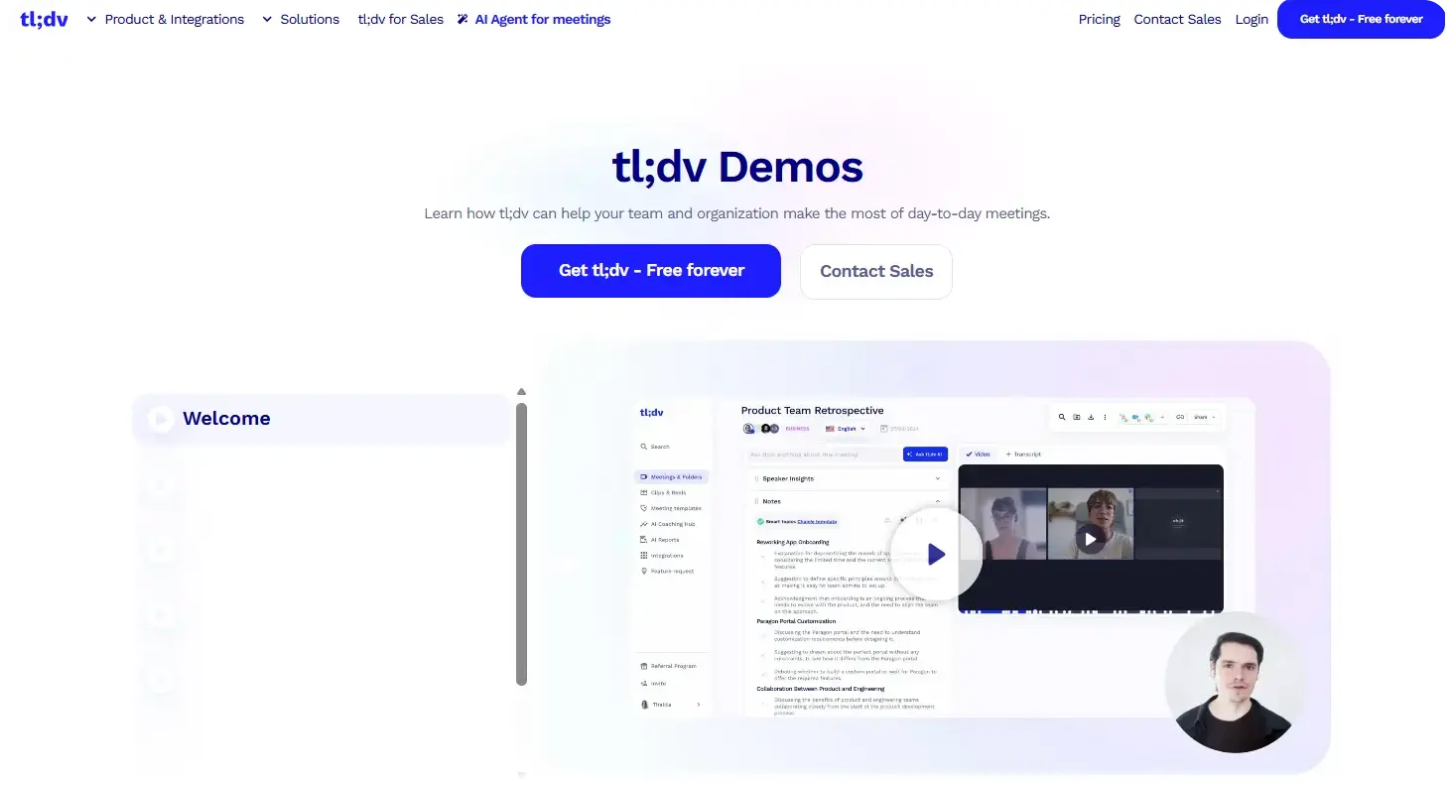

Image Source
Alt text: tl;dv demo page showing a recorded product team retrospective with AI notes
Best for you if you sell and want call notes logged in your CRM automatically.
tl;dv logs CRM outcomes after every call and drafts follow-up emails. Read AI's Meeting Coach scores your talking speed and filler words, and tl;dv tracks how your whole sales team follows the playbook. See more AI tools to automate your follow-up emails.
Key features:
- Managers track objection handling across reps.
- Multi-meeting insights pull trends from many calls at once.
Limitation:
tl;dv doesn't have a native mobile app yet, according to its own FAQ. Our roundup of tl;dv alternatives covers tools with one.
Pricing:
tl;dv's free plan covers unlimited meetings. Pro costs $18/user/month billed annually, or $29/user/month month-to-month, but playbook monitoring and multi-meeting insights belong to Business ($29 or $39). Enterprise pricing is custom. You can check out the detailed tl;dv pricing here. Pricing last verified on October 9, 2026.
6. Granola

Alt text: Granola notepad transcribing a sales sync without a bot, next to a two-person video call
Best for you if you want meeting notes with no bot in the call.
Granola captures device audio on desktop and mobile and writes AI notes without joining the call. Read AI joins Zoom and Teams as a participant and can use Google Meet's native recording, while Granola works on any platform.
Key features:
- AI chat runs within and across meetings.
- SOC 2 Type II certification and a model training opt-out come standard.
Limitation:
Granola deletes audio after transcription, leaving you with no recording to replay. See the trade-off in our Granola vs Fireflies comparison.
Pricing:
Granola's Basic plan is free but limits your meeting history. Business costs $14/user/month and adds unlimited notes and integrations such as HubSpot and Notion. Enterprise, at $35/user/month, adds SSO and admin controls, and the page lists one rate per tier. You can check out the detailed Granola pricing here. Pricing last verified on October 9, 2026.
7. Microsoft 365 Copilot

Alt text: Microsoft 365 Copilot notebook prompt for asking Copilot about project references
Best for you if your organization has standardized on Microsoft 365.
Microsoft 365 Copilot answers questions during Teams meetings, recaps them afterward, and also works in Word, Excel, PowerPoint, and Outlook. Read AI also covers Zoom and Google Meet, where Copilot's meeting features don't reach. Our guide shows how to take meeting notes in Microsoft Teams.
Key features:
- Intelligent recap comes with the Microsoft 365 Copilot license.
Limitation
Microsoft states Copilot won't work in meetings hosted outside your organization, including calls your clients host. Our Fireflies vs Microsoft 365 Copilot review compares both.
Pricing
Copilot Business costs $18/user/month billed annually, a promotional rate down from $21, or $25.20/user/month month-to-month, for up to 300 users. Larger organizations pay $30 or $31.50 for Microsoft 365 Copilot. Both require a qualifying Microsoft 365 plan. You can check out the detailed Microsoft 365 Copilot pricing here. Pricing last verified on October 9, 2026.
Also read: Fireflies vs Zoom AI Companion
How to Switch From Read AI
Whichever of the Read AI alternatives you pick, plan the switch over a week, and use the last step to learn how to remove Read AI from meetings.
- Export what you want to keep. Open each report you need, click Download at the top right, and pick a section such as the transcript. Deleting your account later removes every report you own.

Alt text: Read AI meeting report with the Download drop-down menu open
- Set up Fireflies capture rules. Choose an auto-join option and add Recording Rules for calls you always want captured. Zoom-heavy teams can check the best AI note takers for Zoom. Google Meet teams can learn how to transcribe Google Meet.
- Tell your team. Fireflies can email participants an hour ahead and post a chat message when recording starts. Our follow-up email templates speed up the announcement.
- Run both tools for a week. Compare each tool's output to a well-written meeting summary.
- Remove Read AI from your calendar and account. In Account Settings, turn off joins under Meeting Recording, then Auto-Join Preferences.

Alt text: Read AI Account Settings showing Auto-Join Preferences under Meeting Recording
Next, open the Integrations page and disconnect any Google, Outlook, or Zoom calendar you connected to revoke Read AI's calendar access.

Alt text: Read AI Integrations page with calendar connections to disconnect
Finally, click Delete my account on the Advanced tab, and switch off "Auto-open in meetings" in Read's Zoom app.


Alt text: Read AI Advanced settings tab with the Delete my account button
Pro Tip: Knowing how to remove Read AI from meetings only helps if you find every account. Check each email address you use in Read AI's Account & Privacy Center, because a second account created from a shared report can keep the assistant joining your calls. |
Choosing Your Read AI Replacement
Test your top pick on a week of real meetings before you cancel Read AI. If you need meetings, email, Slack, and CRM in one workspace, start with Fireflies. Every other reason on the Read.ai alternatives shortlist above has a clear match.
Frequently Asked Questions
What is the best alternative to Read AI?
The best alternative to Read AI for most teams is Fireflies. It covers meetings, email, Slack, and CRM in one workspace, transcribes 100+ languages with 99% accuracy in English and 95% in other languages, and costs $10/user/month billed annually against Read AI Pro's $15.
Is there a free alternative to Read AI?
Yes, several free alternatives to Read AI exist. Fathom's free plan includes unlimited recordings, Otter Basic gives you 300 transcription minutes a month, and Fireflies offers 3 AI summaries a month with 800 minutes of storage per seat (pooled).
Is Read AI safe to use?
Read AI is safe to use if its controls match your needs. It says it encrypts data in transit and at rest, doesn't sell your data, and trains on meetings only with your opt-in. For health data, you need Enterprise+, the only tier with HIPAA compliance.
How do I remove Read AI from my meetings?
You can remove Read AI from your meetings by typing "Read Stop" or "Opt out" in the chat, or by removing it from the participants panel, and opt out also deletes the recording. To stop future joins, change your Auto-Join Preferences or delete your account.
Is Fireflies better than Read AI?
Fireflies is better than Read AI if you want one tool across meetings, email, Slack, and CRM. You get 100+ transcription languages to Read AI's 35, and 200+ AI Skills. Both offer bot-free options through the Fireflies Desktop App and Read AI's native Google Meet recording.

Shivani Bohare is a freelance B2B SaaS content writer and editor with 7 years of experience across engineering, sales and marketing. Her writing spans AI and productivity tools, conversational AI and voice tech, sales and marketing tech, and fintech.